Change how Pando thinks and talks
Six dials: how hard it thinks, how much it talks, how carefully it plans, how much it writes down, how simple it keeps the code and how it tidies a long chat.
Pando is one assistant with several moods. This guide is a tour of the dials that change its mood: you will learn where each one is and when to turn it. You need a working session. Screens are from the Web UI; the desktop app is the same.
Most dials are commands you type in the chat box. Type / to see them all.
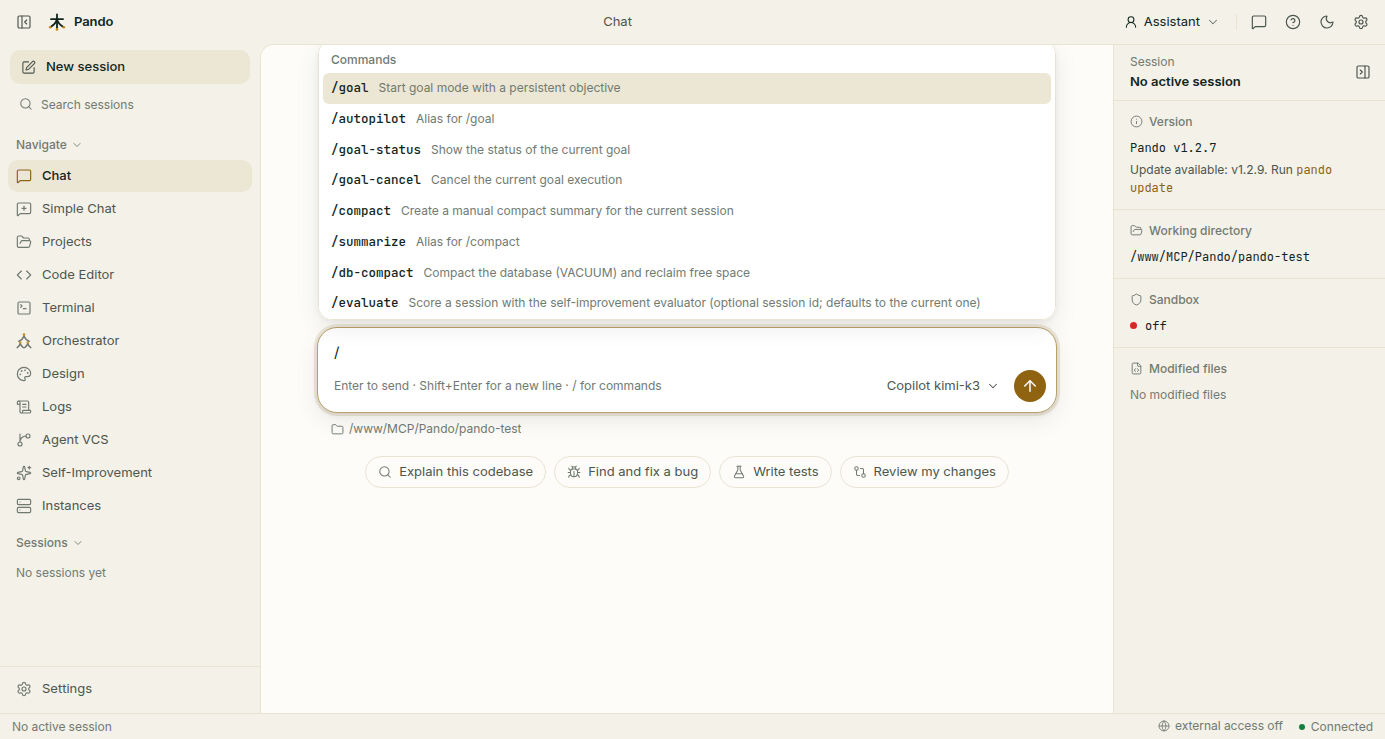
Decide how hard it thinks
Some questions deserve a long think; others just need doing. Open Settings > Agents and click Coder, the agent that does the main work.
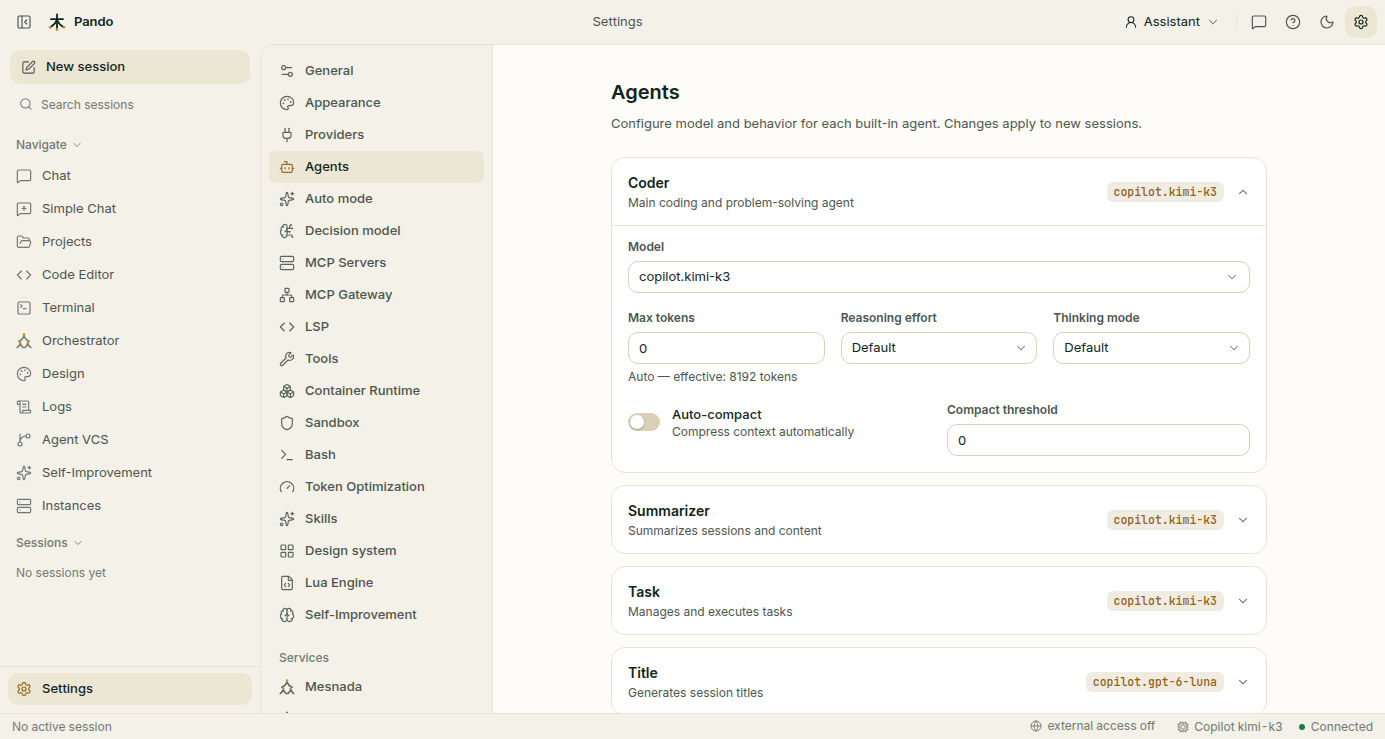
- Reasoning effort goes from None to High. Default lets Pando choose what suits the model.
- Thinking mode is the same idea for models that set aside part of their answer for thinking: Low, Medium or High share of the budget.
Not every model has the same steps on the dial. Pando only offers the ones your model accepts, and quietly adjusts a value the model would reject. You can also change the effort from the model list in the chat when the model allows it.
| Effort | Good for |
|---|---|
| None, minimal | Formatting, translations, repetitive edits |
| Low | Everyday coding in code you know well |
| Medium | Most things |
| High and above | Design decisions, a bug you do not understand, planning a big change |
More thinking costs more and takes longer. A common trick: plan at high effort, then drop to low for the mechanical part.
Make it talk less
Caveman mode trims the chatter: no greetings, no repeating your question back, no “let me now…”. Code, commands, errors and test results are never trimmed, and Pando thinks just as much.
In the chat:
/caveman lite     # normal sentences, filler removed
/caveman full     # short lines and bullets
/caveman ultra    # only the bare facts
/caveman off      # back to normal (also /caveman-finish)
That changes the current session. To choose the level new sessions start with, open Settings > General, scroll to Feedback Optimization and set Caveman Output Brevity.
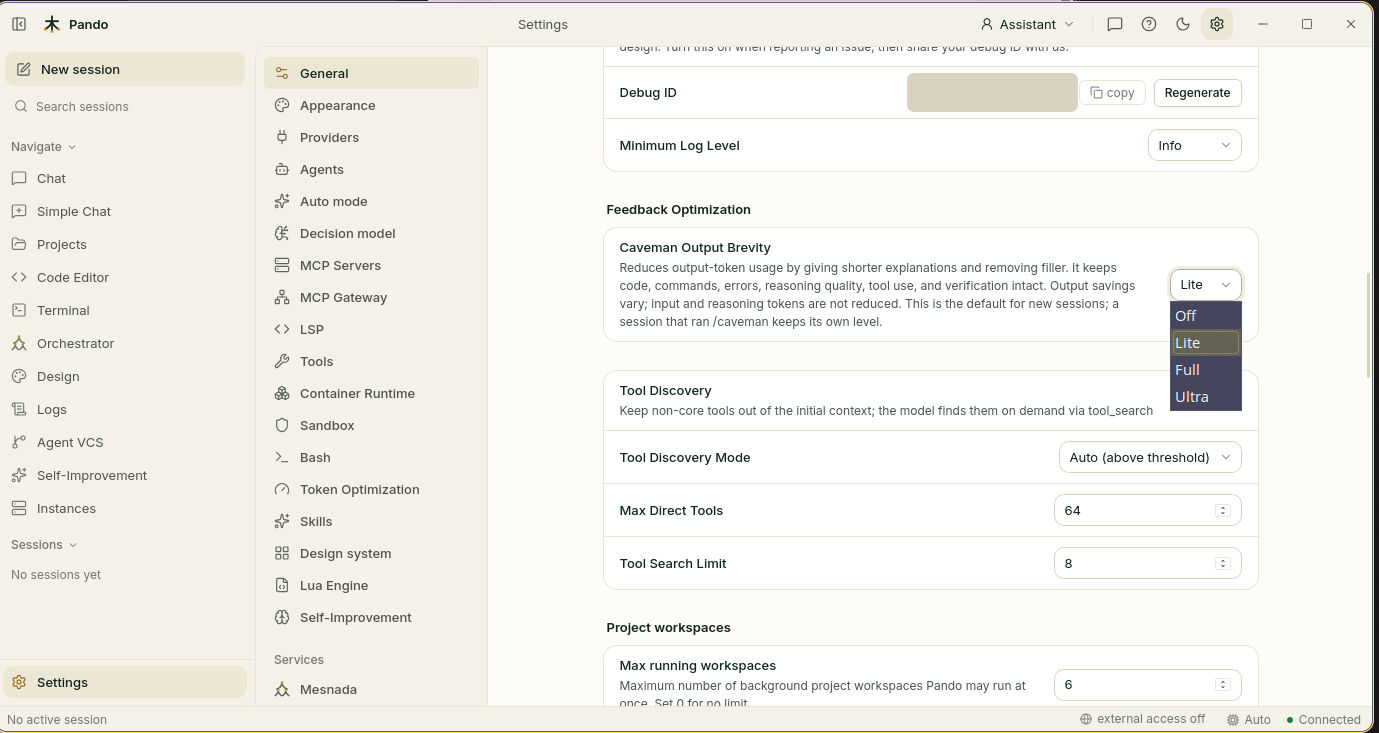
If you ask for an explanation (“walk me through it”), you get the full explanation for that answer.
Make it plan before it builds
Superpowers mode turns Pando into the colleague who refuses to start without a plan: first understand, then propose a design and wait for your OK, then write the plan, then build with tests, then check the result for real.
/superpowers                   # switch it on
/superpowers Fix login bug     # switch it on with an aim
/superpowers-finish            # wrap up: what was done, what was not, what comes next
Use it for changes that touch many files or must not break. Skip it for a quick fix. While it is on, Pando never commits, pushes or switches branches by itself.
Make it take notes
Learning mode turns Pando into a careful note-taker. Before building on earlier work it looks up what it already knows; it asks you the decisions that are yours; and it writes down what it discovers so the next session starts ahead.
/learning                        # switch it on
/learning auth system changes    # switch it on, focused on a topic
/learning-finish                 # tidy the notes and switch it off
It needs Remembrances to have somewhere to write. Use it when you start on a new area or on a project that will last.
Keep the code simple
Ponytail is the voice of the veteran who asks “do we really need this?”. It pushes Pando towards the smallest change that solves the problem.
/ponytail lite     # builds what you ask, and mentions the lazier option
/ponytail full     # built-in tools first, smallest change, shortest explanation
/ponytail ultra    # removes before adding, and questions the request itself
/ponytail off      # back to normal
Good for clean-up sessions and for projects that have grown more complicated than they should.
Tidy up a long conversation
A model can only keep so much conversation in its head. When a chat gets long, compacting replaces the old part with a summary, like turning twenty pages of meeting notes into one page of conclusions.
/compact/summarize does the same. To let Pando do it by itself when the conversation is nearly full, go back to Settings > Agents > Coder and turn on Auto-compact. Compact threshold says how full is “nearly full”; 0 lets Pando decide. The Summarizer agent on the same page is the one that writes the summary, and a cheap model is enough for it.
Compact after finishing one task and before starting another.
Mix them
The dials are independent. /superpowers plus /caveman lite gives a careful process with short answers. /learning plus /ponytail full gives simple code and good notes.
Caveman and Ponytail can have a default for new sessions. Superpowers and Learning are always switched on by hand, session by session, and they do not survive closing Pando.
Check it works
Type /caveman ultra and ask “what does this project do?”. The answer should be a handful of bare lines. Type /caveman off and ask again: the full sentences are back.
If something goes wrong
| What you see | What to do |
|---|---|
| The effort you want is not in the list | That model does not accept it. Pick another model or the closest value |
| Caveman answers are too terse | Go down a level, or ask “explain” for one answer |
/learning-finish did not switch it off | The closing step was interrupted. Run it again |
Pando forgot something after /compact | Summaries keep decisions, not every detail. Paste the detail again, or keep it in memory |
Prefer the terminal?
All the commands work the same in the terminal interface. The defaults can be set in the config file; the keys are in the working modes reference.
To read more about each dial: Thinking & reasoning effort, Caveman, Superpowers, Learning, Ponytail and Session compaction.