Goal Mode: long tasks without babysitting
Give Pando a finish line and let it keep going, step after step, until it gets there.
Normally Pando does one thing and waits for you. In Goal Mode you tell it where the finish line is and it keeps walking: it works, looks at what it achieved, decides the next step and goes on. This guide shows how to start a goal, follow it, stop it and keep it on a leash.
You need a working session. The steps are for the Web UI; the desktop app is identical.
Write a goal with a clear finish line
A goal works when Pando can tell by itself that it is done. Compare:
- Vague: “Improve the tests.”
- Clear: “Make every test in
./internal/authpass. Stop whengo test ./internal/authis green.”
Say what to reach and how to check it. Leave the “how” to Pando.
Start the goal
In the chat box type /. A list of commands opens; the first ones are about goals.
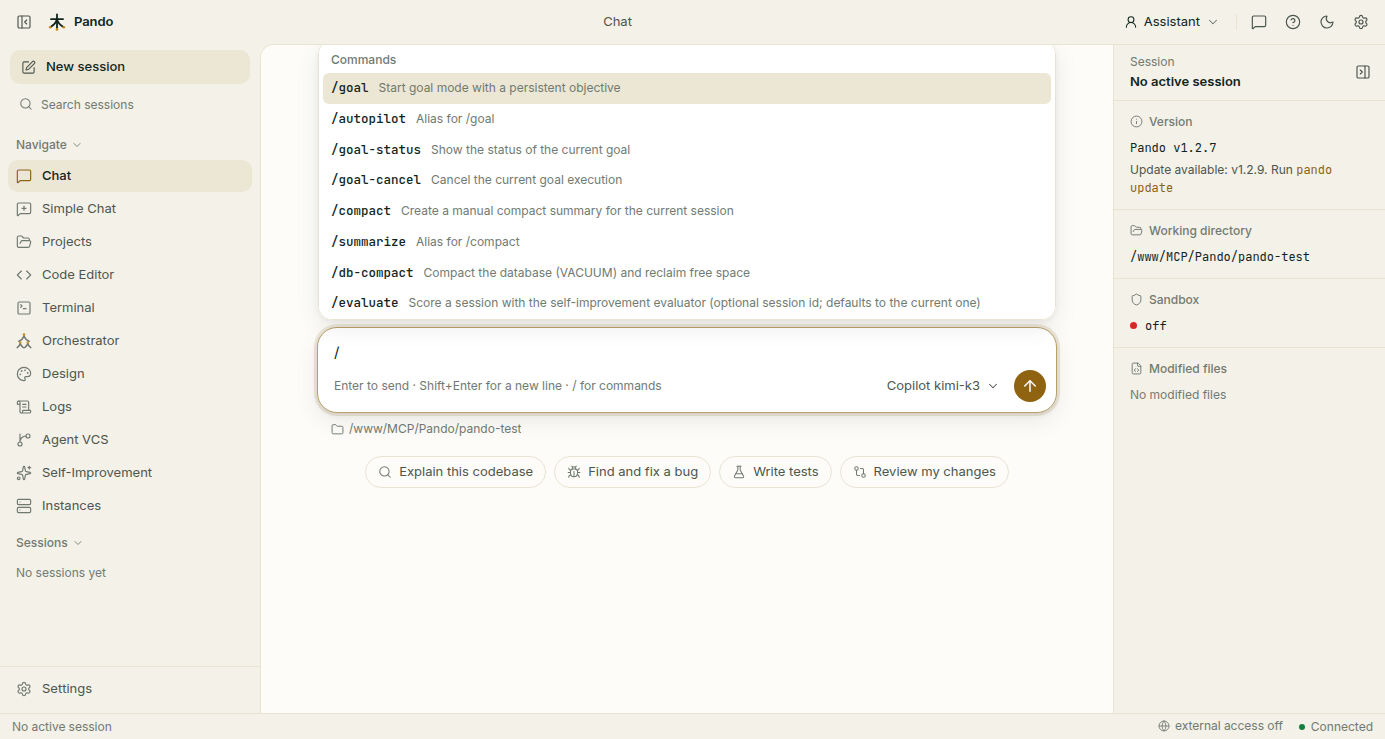
Write the command followed by your goal and press Enter:
/goal Make every test in ./internal/auth pass. Stop when go test ./internal/auth is green./autopilot does exactly the same.
Follow the progress
A goal card appears in the chat. It shows:
- a status badge: Running while it works;
- your goal, as you wrote it;
- Iteration 3/20: which lap it is on and how many it may do;
- the time since it started;
- Progress: what it has achieved so far;
- Next step: what it is about to try.
You can leave the window. The goal keeps running. To ask how it is going at any time, type /goal-status.
Stop it if you need to
Press Cancel on the goal card, or type /goal-cancel. Pando finishes what it has in hand and stops. Nothing it already did is undone.
Read how it ended
| The card says | What it means |
|---|---|
| Completed | It reached the finish line |
| Blocked | It needs something only you can give: a password, a decision, a missing file |
| Cancelled | You stopped it |
failed | It concluded the goal cannot be reached |
timeout | It used up its laps or its time |
stalled | Several laps in a row without getting closer |
When it ends blocked or stalled, read Progress and the last messages, give it what it lacks and start a new goal from there.
Put it on a leash
Goal Mode has no settings page yet; its limits live in the config file (.pando.toml in your project or ~/.pando.toml):
[Goal]
MaxIterations = 20       # laps before it gives up
MaxDuration = '1h'       # time before it gives up
StallIterations = 3      # laps without progress before it stops
AutoApprove = true       # do not ask permission for each tool
DangerousPatterns = []   # commands it must never run, as patterns
With AutoApprove = true Pando does not stop to ask before each action, which is the point of walking alone. If that worries you, keep the command sandbox on and add what must never happen to DangerousPatterns.
Check it works
Try a goal that is small and safe:
/goal Create a file called HELLO.md with one line of text. Stop when the file exists.The card should go from Running to Completed in one or two laps, and the file should be there.
If something goes wrong
| What you see | What to do |
|---|---|
It stops at stalled very soon | The goal is too vague. Add how to check it is done |
It ends at timeout | Raise MaxIterations or MaxDuration, or split the goal in two |
| It keeps asking for permission | Set AutoApprove = true |
| It did something you did not want | Stop it, then review and undo |
Prefer the terminal?
In the terminal interface the same commands work, and Ctrl+C cancels the goal instead of closing Pando. To run a goal with no window at all, for scripts or overnight jobs:
pando --goal "Fix the failing Go tests and stop when they pass"
pando --goal "Refactor auth module" --model copilot.gpt-5.4
It prints a short report when it ends. The details are in the Goal Mode reference, and the idea is explained in Goal Mode.