Choose a model that reads code
Give Pando's code search a helper model trained on code, so it finds functions by what they do in any of your languages.
At the end of this guide Pando will search your code with a helper model trained on code instead of one trained on ordinary text. It takes ten minutes and a download of 90 to 170 MB. You need Remembrances switched on and Ollama running. Why this matters is explained in Code search by meaning.
Screens are from the Web UI; the desktop app is the same.
Pick your model
Three good choices, all free and all running on your machine:
| If you… | Use | Size |
|---|---|---|
| want the smallest and fastest | CodeRankEmbed | 90 MB |
| write in many languages (Rust, C#, shell, SQL, Lua…) | Jina Embeddings v2 Base Code | 170 MB |
| also want one model for notes in several human languages | Qwen3 Embedding 0.6B | 640 MB |
If you are unsure, take the second one: it knows thirty programming languages and is almost as fast as the first. The reference has the details of each, and the ones that do not work.
Download it
Ollama can fetch models straight from Hugging Face, the public library where these models are published. Open a terminal and run the line of the model you chose:
# CodeRankEmbed
ollama pull hf.co/brandtcormorant/CodeRankEmbed-Q4_K_M-GGUF:Q4_K_M

# Jina Embeddings v2 Base Code
ollama pull hf.co/ggml-org/jina-embeddings-v2-base-code-Q8_0-GGUF:Q8_0

# Qwen3 Embedding 0.6B
ollama pull qwen3-embedding:0.6b
Tell Pando to use it for code
Open Settings > Remembrances and scroll to Code embeddings.
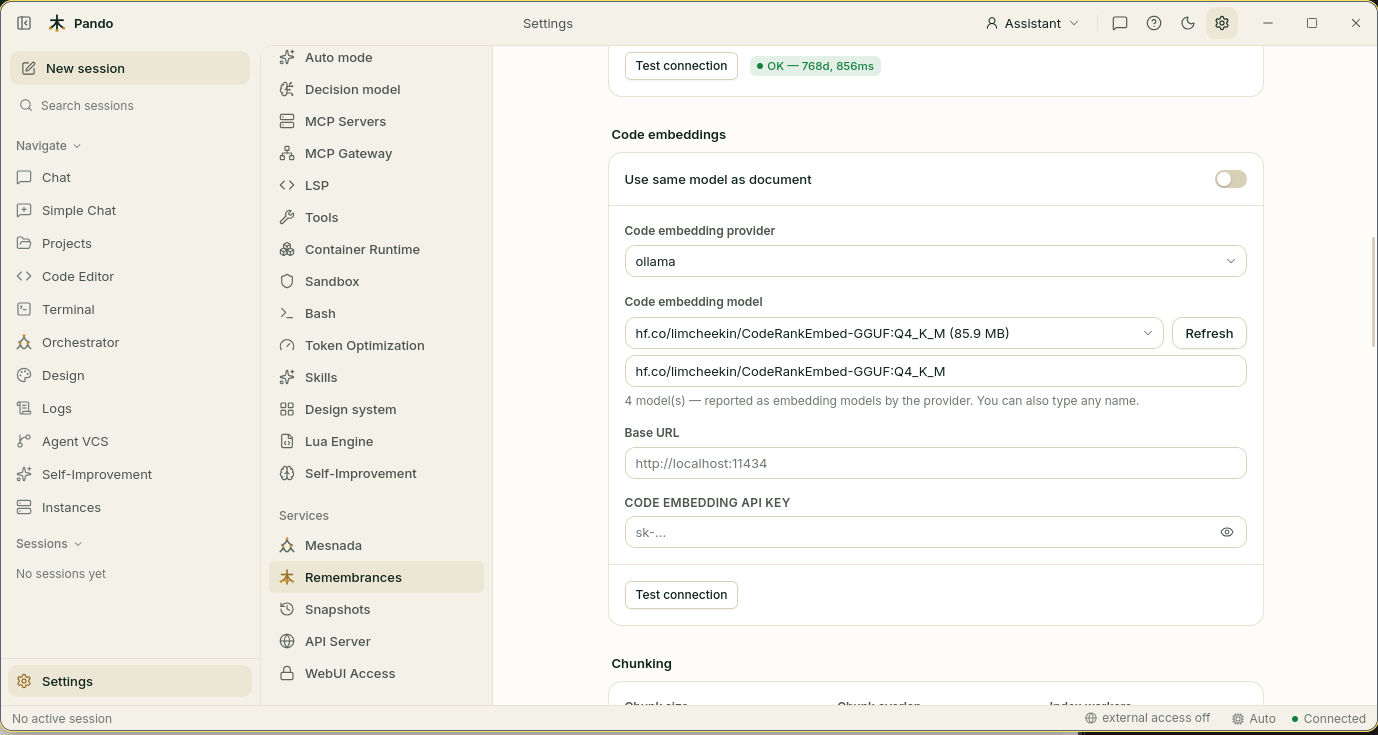
- Turn Use same model as document off. The fields for a second model appear.
- In Code embedding provider choose ollama.
- Press Refresh and choose your model in Code embedding model. If it is not in the list, paste its full name in the box underneath, exactly as you typed it after
ollama pull. - Leave Base URL and the API key empty.
- Press Test connection. A green OK with a number such as
768dmeans the model answers. - Press Save.
The model for your notes, under Document embeddings, stays as it was.
Draw the map again
A new librarian cannot read the old one’s index cards, so the map of your code has to be redrawn. Scroll to Code indexing and press Re-index all.
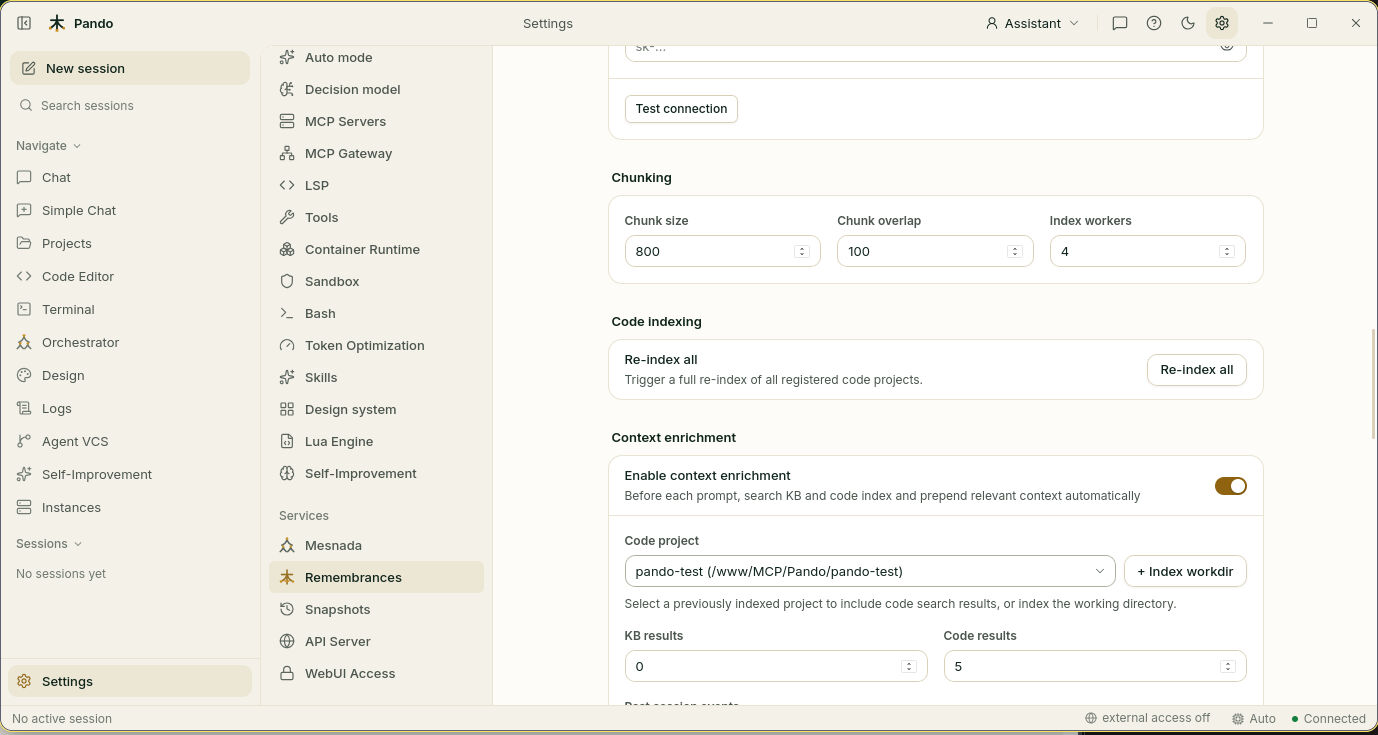
Pando walks through your project again in the background. You can keep working; searches get better as it advances. Index workers, under Chunking, is how many files it reads at once: raise it on a strong computer, lower it if the fan complains.
Check it works
Start a new session and ask about your code without using the words that appear in it. If you have a function called ValidateToken, ask: “Where do we decide whether a visitor may come in?” Pando should go to that function on the first try.
If something goes wrong
| What you see | What to do |
|---|---|
ollama pull says the model was not found | The address has a typo, or the model was removed. The model that older versions of Pando suggested, hf.co/limcheekin/CodeRankEmbed-GGUF, is no longer published: use the CodeRankEmbed line above |
| The setup assistant could not download the code model | Same cause. The Code model field of the assistant is editable: paste one of the names above |
Test connection fails with a 501 error | That model cannot make embeddings in Ollama. Choose one from the table |
| Test connection fails | Ollama is not running, or the name has a typo. Press Refresh |
| Searches got worse after the change | You have not re-indexed yet. Press Re-index all and wait |
| Indexing is slow | Choose a smaller model, or raise Index workers |
Prefer the terminal?
[Remembrances]
UseSameModel          = false
CodeEmbeddingProvider = 'ollama'
CodeEmbeddingModel    = 'hf.co/ggml-org/jina-embeddings-v2-base-code-Q8_0-GGUF:Q8_0'
The comparison of models and every key are in Embedding models for code.