Slash Commands
Slash commands are the buttons on Pando’s remote control. Instead of explaining what you want in a long sentence, you type / and a word, and Pando switches mode or starts a whole routine. Type / in an empty message box to see them all.
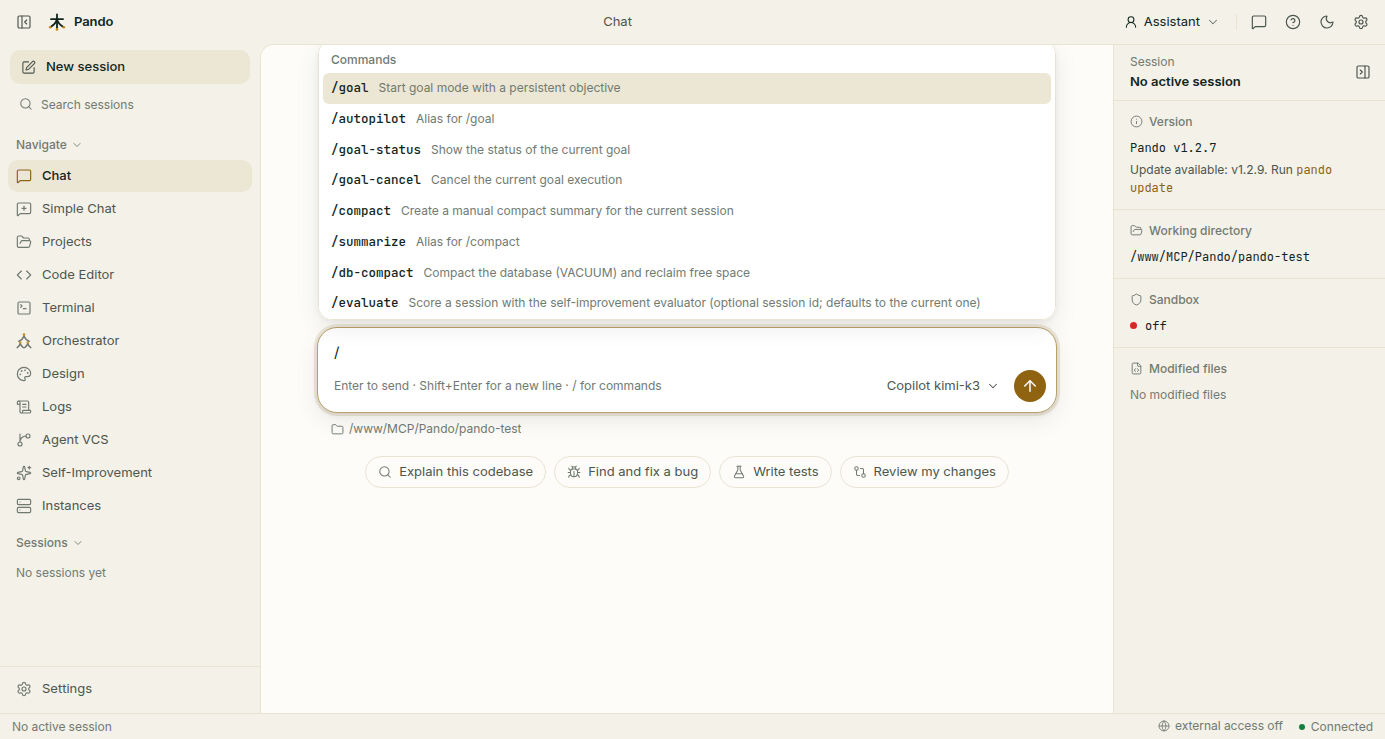
What it does for you
- One word instead of a paragraph.
/compactsays “summarise this conversation so we have room to go on”. - The same everywhere. Web UI, desktop app, terminal interface and the assistant panel of your editor (Zed, VS Code, JetBrains) all understand them.
- Easy to find. The menu filters as you type, so you only need to remember the first letters.
- Yours to extend. A text file in the right folder becomes a new command.
The commands, by what you want to do
Let Pando work on its own
| Command | What happens |
|---|---|
/goal <objective> | Pando keeps working towards that objective, turn after turn, without waiting for you after each step |
/autopilot <objective> | The same as /goal |
/goal-status | Shows how the goal is going: progress, rounds, time spent |
/goal-cancel | Stops the goal |
More in Goal Mode.
Keep a long conversation light
| Command | What happens |
|---|---|
/compact | Replaces the conversation so far with a summary, freeing room to continue. Use it when a session gets long and you do not want to start over |
/summarize | The same as /compact |
/db-compact | Tidies Pando’s storage on disk and gives back the space left by deleted sessions |
More in Session Compaction and Database Compact.
Change how Pando talks
| Command | What happens |
|---|---|
/caveman lite | Drops filler. Normal sentences, fewer of them |
/caveman full | Short by default: conclusions, no explanation you did not ask for |
/caveman ultra | The answer and nothing around it |
/caveman-finish | Back to normal |
Caveman only shortens the words. Pando thinks, tests and checks exactly as much as before, and gives you the full detail whenever you ask. More in Caveman Mode.
Change how Pando works
| Command | What happens |
|---|---|
/ponytail lite · full · ultra | The “lazy senior developer”: Pando prefers the simplest solution and resists building things you will not need, more firmly at each level |
/ponytail off | Back to normal |
/superpowers [objective] | A disciplined routine: understand, design and get your approval, plan, build in small tested steps, prove it works, review |
/superpowers-finish | Checks, reports and returns to normal |
/learning [focus] | Pando behaves like a careful apprentice: reads the project notes first, asks instead of guessing and writes down what it discovers |
/learning-finish | Files what it learned into the project notes and returns to normal |
More in Ponytail, Superpowers Mode and Learning Mode.
Look after the project and teach Pando
| Command | What happens |
|---|---|
/improve-agents-md [guidance] | Creates or strengthens AGENTS.md, the house rules every AI agent must follow in this project |
/evaluate | Scores a session with the self-improvement evaluator (the current one unless you name another) |
/feedback good · /feedback bad | Tells Pando how the session went, overriding its own score |
Hunt for security holes
A security audit routine adapted from Capital One’s VulnHunter. Each run is a one-off job, not a mode that stays on, and its findings are saved in the project notes so the next command can pick them up.
| Command | What happens |
|---|---|
/vulnhunt [scope] | Plays the attacker: follows untrusted input through the code, tries to prove each weakness is real, tries to disprove it, and reports what survives. Give it a folder or a focus to narrow the search |
/vulnhunter-fix [finding] | Fixes a confirmed weakness the careful way: reproduce the attack, write a test that fails, fix, check the attack no longer works |
/vulnhunt-fix-verify [findings] | A second opinion that changes nothing: checks claimed fixes against the code and gives each a verdict (FIXED, PARTIAL, NOT_FIXED or INCONCLUSIVE) |
Your own commands
Write the instructions in a Markdown file and drop it in a commands folder. It shows up in the menu next to the built-in ones, labelled project: if it lives with the project or user: if it lives in your home folder. Folder names are in the reference.
Good to know
- In the terminal interface the menu is a searchable list grouped by category (General, Code Quality, Workflow, Project, Security); in the Web UI it is a drop-down above the message box.
- Outside a chat, in one-line mode, flags do the job:
pando --goal "Fix tests"is the same as/goal. /only opens the menu at the start of an empty message. To mention a file, use@.
Next steps
- Guides: Find your way around the Web UI, Goal Mode, Change how Pando thinks and talks.
- Reference: custom command folders.