Command Sandbox
Pando’s agent types real commands on your real computer. The command sandbox is a playpen around each of those commands: the agent can build, test and tidy inside your project, but it cannot wander off into the rest of your machine. There are no containers and nothing to install. On Linux and macOS it is on from the first day.
What it does for you
- Your project is the only place the agent can write, plus temporary folders and the usual download caches of your tools.
- Pando’s own settings are locked. The agent cannot switch the playpen off by editing a file.
- Your git hooks are locked. A command cannot leave a booby trap that runs later, outside the playpen.
- Your keys are out of sight. Anything in your environment that looks like a key, token or password is hidden from the agent’s commands.
- Pando’s own doors are closed. A command cannot call Pando’s internal services to change settings behind your back.
How it feels in practice
Mostly you notice fewer interruptions. Because a fenced-in command can do little harm, Pando stops asking “may I run this?” for ordinary commands. It still stops for the risky ones, such as sudo or deleting a system folder.
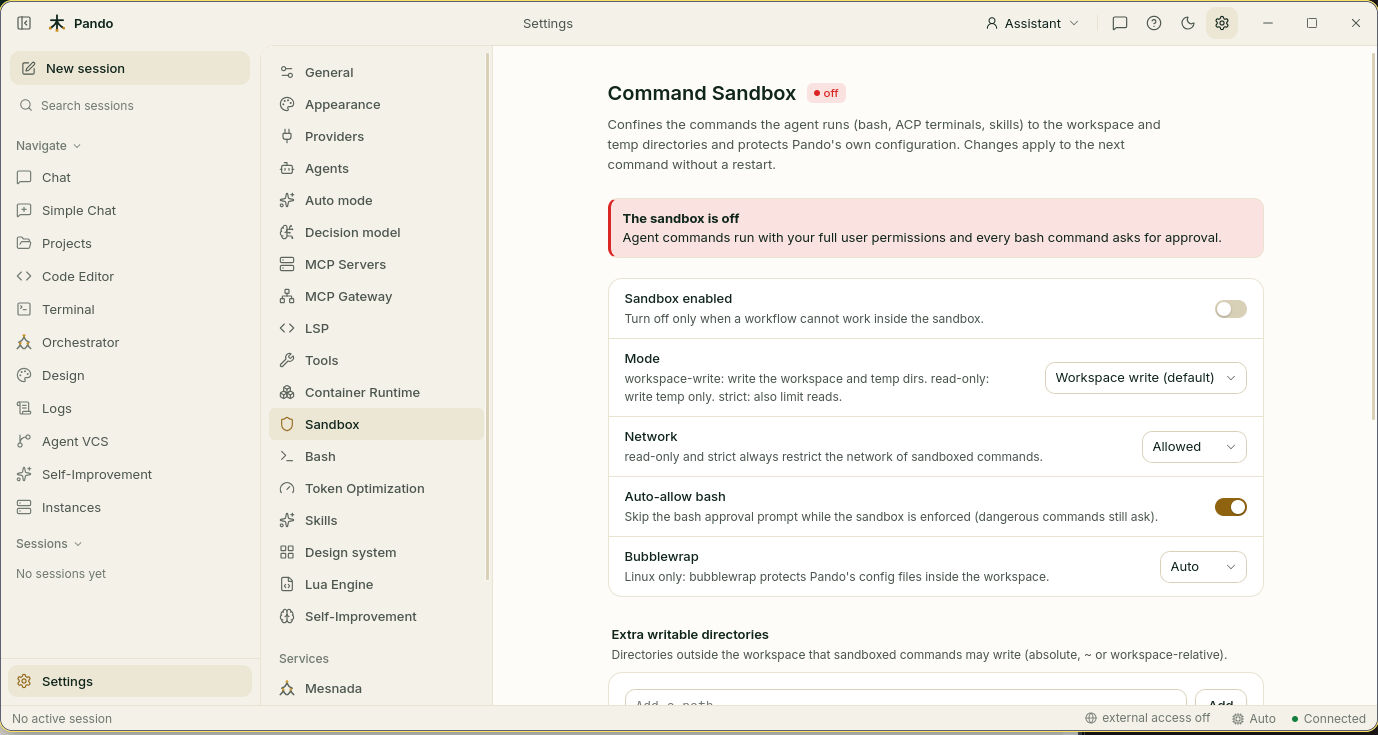
When a command bumps into the fence, the agent is told what happened and why, and nearly always tries again inside the project. If it truly needs to step outside, it asks you to run that single command without the sandbox. That request always needs your own click: no automatic or unattended mode can grant it.
A small badge in the chat info panel shows the current state at all times.
Four fence heights
| Mode | In one sentence |
|---|---|
| Workspace write (default) | Work freely in the project, with internet |
| Read only | Look, don’t touch |
| Strict | A project you do not trust yet: no internet, and the agent cannot even read your home folder |
| Off | No fence |
When to use it
Leave it on. Tighten it to Read only for reviews and to Strict when you open code from a stranger. Turn it off only for a task that cannot work inside the fence, and turn it back on afterwards.
Only commands the agent writes are fenced. Terminals you open yourself run what you type, with no restrictions.
Good to know
- A project cannot loosen your sandbox. Settings that come with a repository can only make it stricter, so cloning something never switches your protection off.
- Changes apply to the next command. Nothing needs restarting.
- Linux: full protection needs a recent kernel (6.7 or later) and the small
bubblewrappackage. Without them Pando protects what it can, says what is missing and keeps asking before each command. - Windows: commands are not fenced. Pando keeps asking before each one.
- If you run commands inside Docker or Podman, the container is the fence and the sandbox steps aside.
- When Pando works inside an editor and the editor runs the command in its own terminal, the editor is in charge.
- Extra tool servers and delegated agents stay outside the fence unless you choose to include them, because they often keep their own files elsewhere.
- Temporary folders are always writable, even in Read only.
Next steps
- Set it up: Sandbox and permissions
- Every option and platform detail: Sandbox reference
- Stronger isolation: Dev containers