Remote Diagnostics
When something goes wrong, describing it is the hard part. Remote diagnostics lets Pando hand its own logbook to the maintainers, so they can see what happened without you copying and pasting anything.
It is off by default. Nothing is sent unless you turn it on.
What it does for you
- No more pasting logs into bug reports.
- A ticket number instead of your name. Pando gives you a random 16-digit debug ID, such as
1234-5678-9012-3456. You quote it in your report and the maintainers find your records with it. - You stay in control. Turn it on for the problem, turn it off afterwards.
How it feels in practice
You flip one switch, repeat whatever went wrong and paste the debug ID in your bug report. That is the whole ritual.
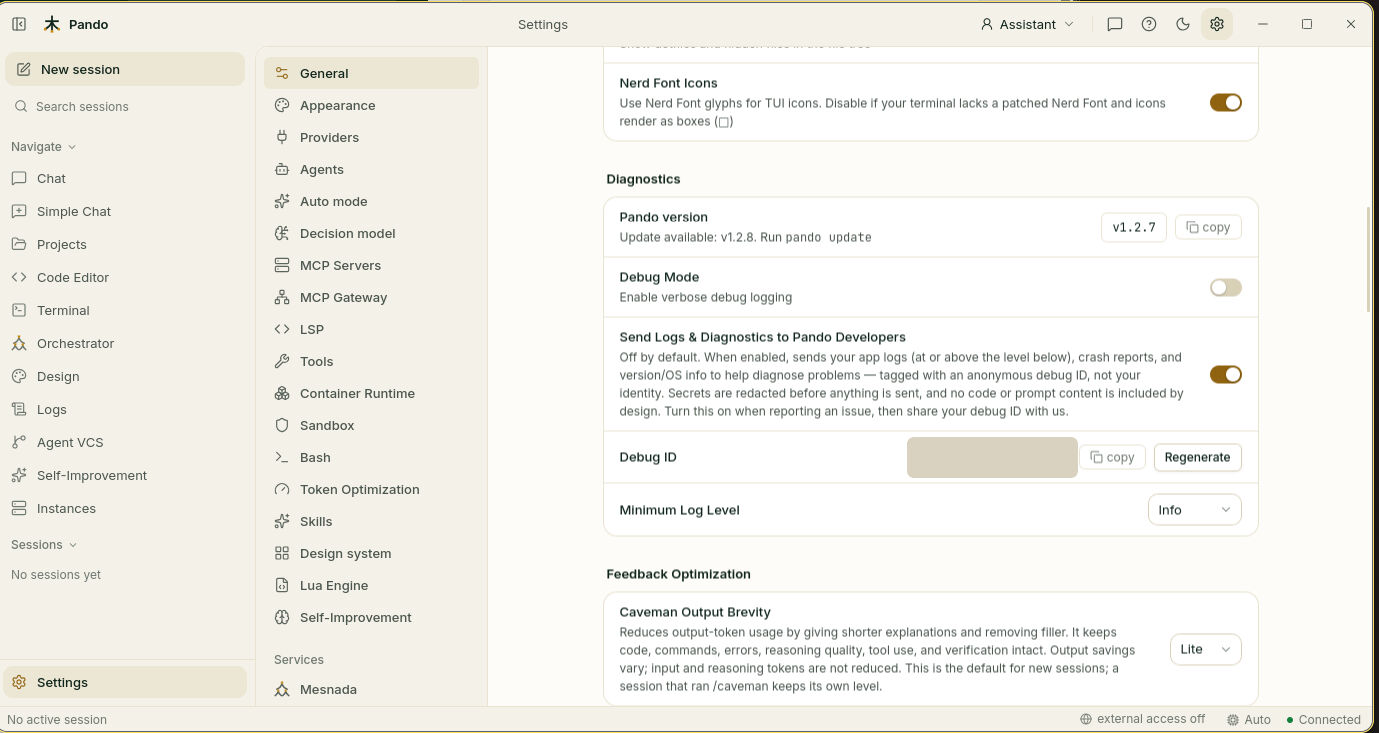
The ID is kept when you switch diagnostics off, so the same one works through a whole troubleshooting conversation. You can replace it with a fresh one at any time.
What is sent
The lines of Pando’s logbook: the time, how serious the entry is, the message, your debug ID, the Pando version and operating system, and a short summary of which tools ran.
What is never sent
- Your code or the contents of your files
- Your conversations with the model
- Keys, tokens and passwords: anything that looks like a secret is replaced by
[REDACTED] - Your home folder path, which is rewritten as
~
The debug ID is random. It is not made from your user name, your machine or anything else that identifies you.
When to use it
When you report a problem and want it understood quickly. There is no benefit in leaving it on the rest of the time.
Good to know
Remote diagnostics exists in the official downloads. If you built Pando yourself, the switch is unavailable. That is expected.
Next steps
- Turn it on and report a problem: Update and diagnostics
- Commands and exact contents: Diagnostics and maintenance reference