Model Auto Mode
Auto mode lets Pando choose the model for each message. Imagine a receptionist at a clinic: you say what is wrong and they send you to the right door, the specialist for something serious and the nurse for a plaster. You describe a few kinds of work and say which model takes each one. Hard work goes to your strongest model, quick questions to a cheap or local one.
It is off by default.
What it does for you
- You stop switching models by hand. Choose Auto once and forget about it.
- You spend where it matters. The expensive model is used only for the work that needs it.
- It never leaves you waiting. If no door fits, or the receptionist is away, the message goes to your usual model.
- It has a plan B. Each kind of work can name spare models for when the first one is busy or down.
How it feels in practice
You pick Auto in the model list and write as always. For each message a very small, very fast decision model reads it, picks the kind of work that fits best and Pando answers with the model you assigned. A line in the chat tells you which one it chose:
Auto: implementation → anthropic.claude-sonnet-4 (p=0.93, 38 ms via ollama/tev1:0.8b)The choice is made once per message. While Pando works through its steps for that message, the model stays the same.
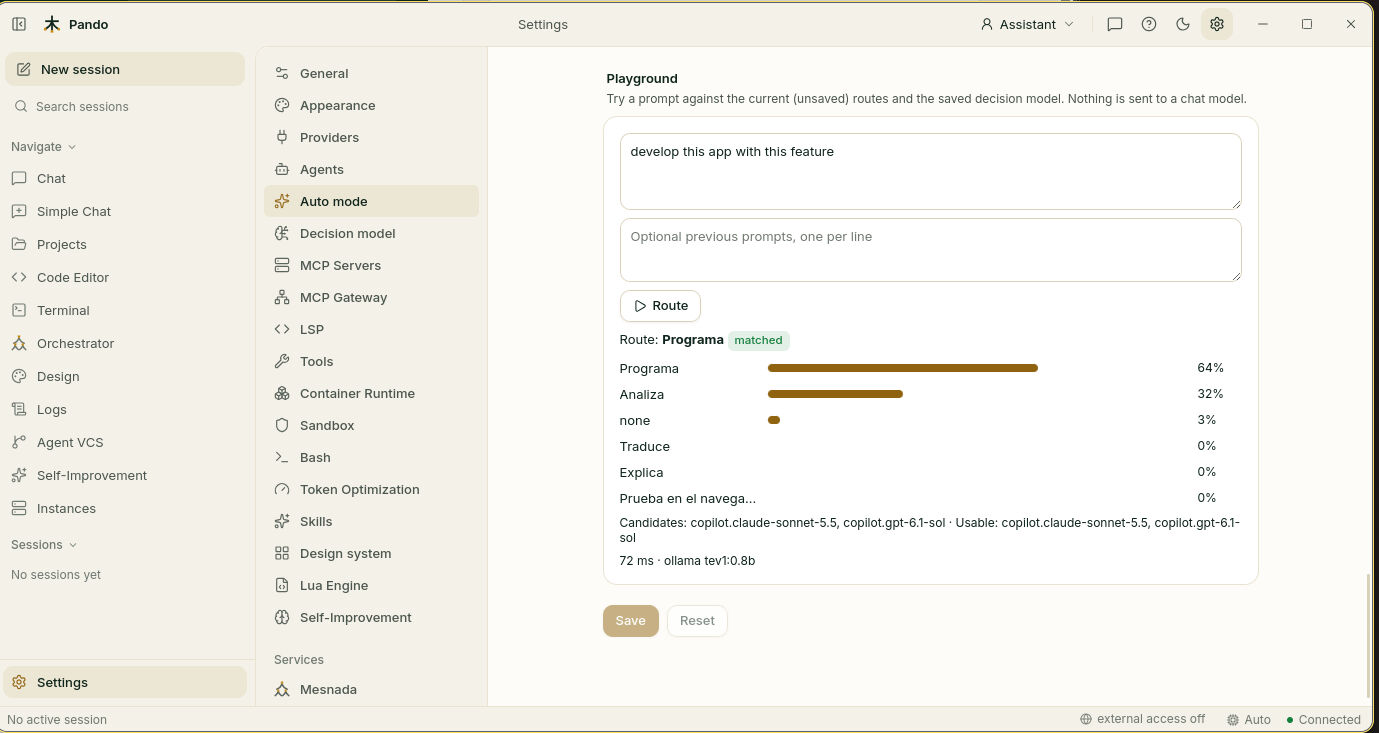
Before trusting it, you can rehearse: a playground shows which door a sample message would be sent to, without spending anything.
When to use it
Use it when you have models of different price and strength and your days mix quick questions with real work. If you only use one model, it adds nothing.
Good to know
- The receptionist is a tiny model that runs on your machine with Ollama. Pando does not install it for you.
- Few kinds of work, clearly different, work best: three to five. Overlapping descriptions leave no clear winner.
- Short replies such as “ok, go on” fit no kind of work and stay on your usual model. That is usually what you want.
- Helpers launched by delegation keep their own model.
- Jumping between models in one conversation makes the provider’s discount for repeated context less effective. Few routes with stable models keep the cost down.
- Choosing a concrete model switches Auto off for that session.
Next steps
- Guide: Let Pando pick the right model for each message.
- Reference: Auto mode and decision model.
- Related: Decision model, Thinking & reasoning effort.