Inter-Process Communication (IPC)
You can have Pando open several times at once: the desktop app, a browser tab, a terminal, one window per project. IPC is how those windows talk to each other, so they behave as one Pando and not as strangers. Picture a team with walkie-talkies: everyone hears what happens, and one of them keeps the logbook.
What it does for you
- Every window stays up to date. A session you start in one place shows up in the others, and you can watch an answer being written from any of them.
- No two hands on the logbook. One window is in charge of writing to Pando’s database; the others ask it to. Your history cannot get scrambled by two windows saving at the same moment.
- Nobody is indispensable. If the window in charge closes or dies, another one notices within seconds and takes over. The rest reconnect by themselves.
- Windows can lend a hand. One Pando can pass a task to another that is already open on a different project, instead of starting a new one from cold.
How it feels in practice
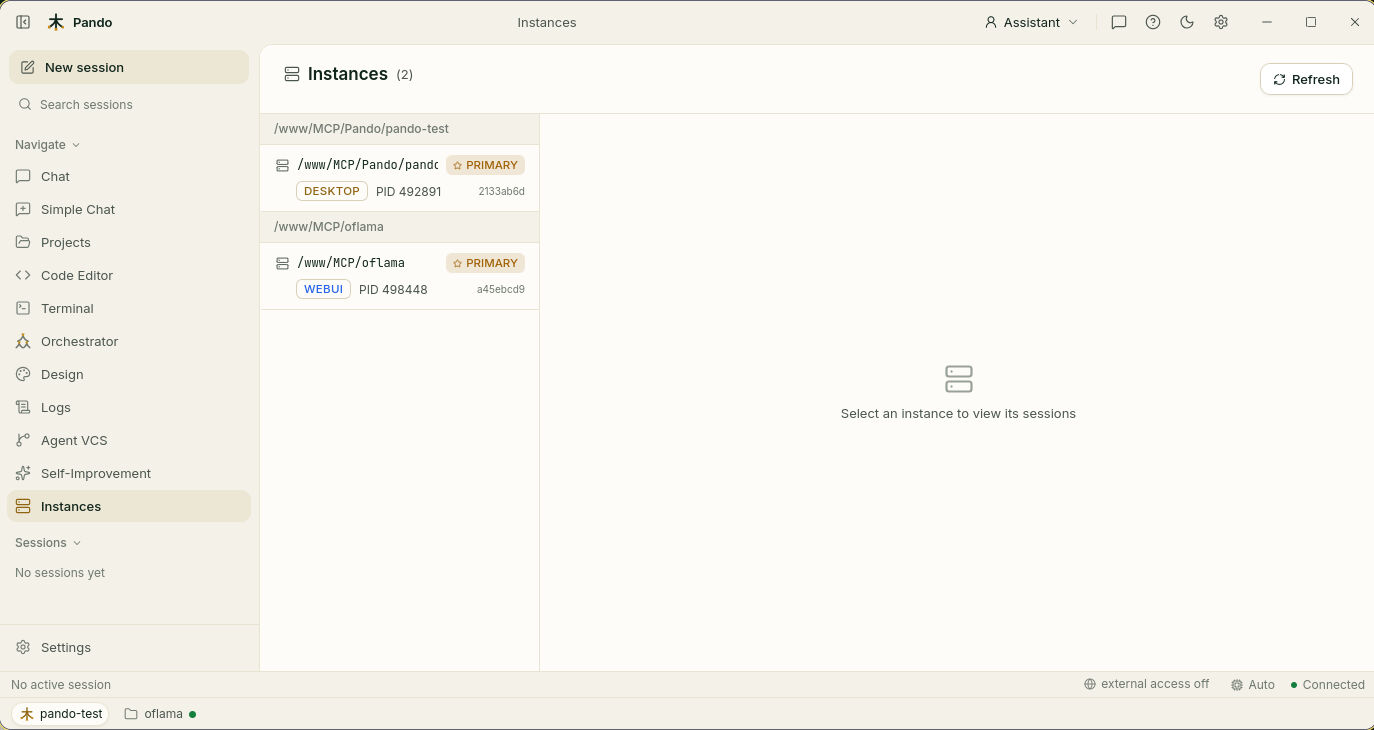
Mostly, you do not notice it, and that is the point. The one place you see it is the Instances screen, which lists every Pando running on your machine, which one is in charge (marked PRIMARY) and how each was opened.
When to use it
It switches itself on as soon as a second Pando starts. There is nothing to enable.
The only part you opt into is letting windows hand tasks to each other: both the one that asks and the one that accepts must agree.
Good to know
- It works between windows on the same machine, not across the network.
- Tidying the database is always done by the window in charge, whichever window you ask from.
Next steps
- Guide: Delegate to subagents with Mesnada covers handing work between projects.
- Reference: timings, messages and the hand-over switches.
- Related: Project Workspaces, Agent Delegation.