Working Modes and Session Housekeeping
Commands, defaults and keys for reasoning effort, Caveman, Ponytail, Superpowers, Learning, session compaction and snapshots. The guides that teach them: Change how Pando thinks and talks and Review and undo what the agent did.
Reasoning effort and thinking
Per agent. Web UI: Settings > Agents, inside each agent.
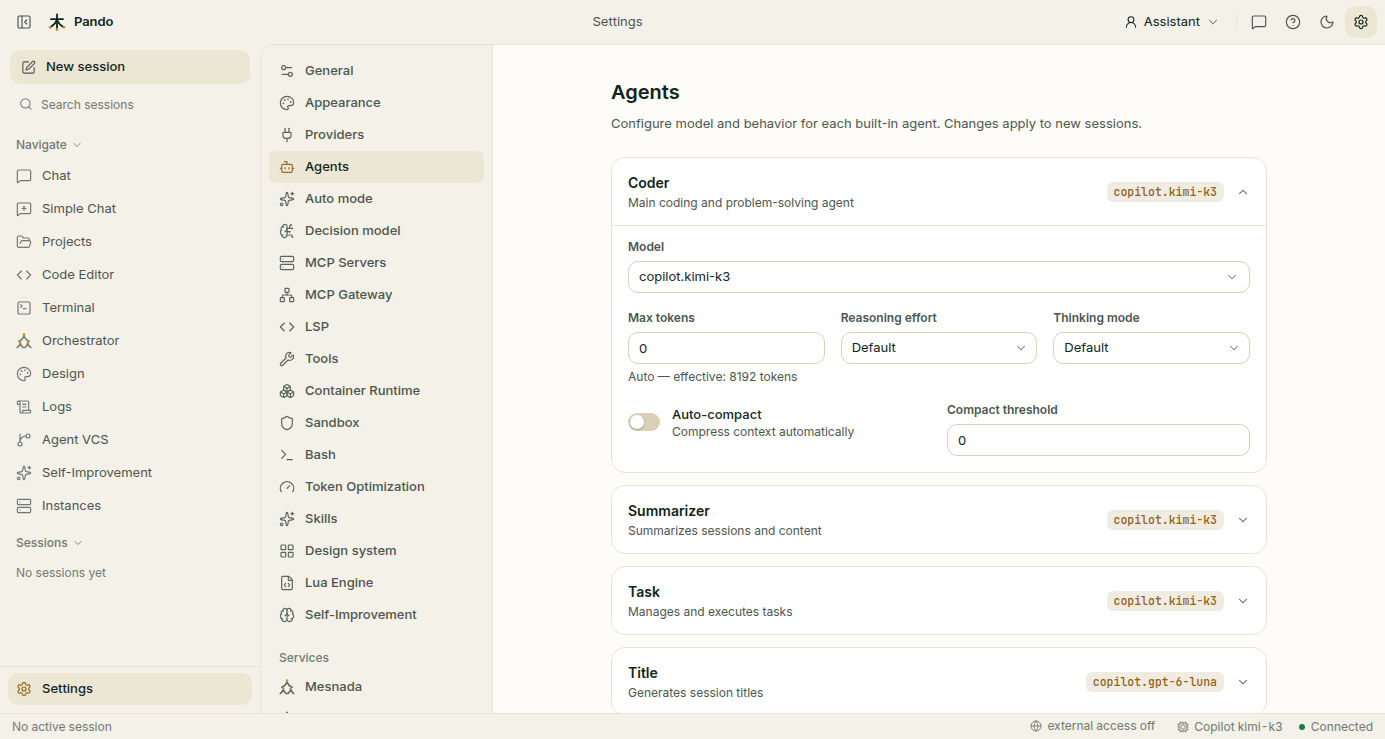
[Agents.coder]
Model           = 'anthropic.claude-sonnet-5'
ReasoningEffort = 'high'
ThinkingMode = ''| Key | Values | Notes |
|---|---|---|
ReasoningEffort | none, minimal, low, medium, high, xhigh, max | Which ones apply depends on the model. Empty lets Pando choose the model’s default (medium when available, otherwise the closest) |
ThinkingMode | disabled, low, medium, high | For models with a thinking budget: 20%, 50% or 80% of it |
Pando offers only the values the selected model supports and clamps anything out of range instead of failing. The model selector in the TUI and Web UI shows the effort options of the selected model; in editors over ACP (Zed, VS Code, JetBrains) the session settings menu lists them and is rebuilt when you switch models. Model capabilities are enriched from models.dev.
Caveman (output brevity)
| Command | Effect |
|---|---|
/caveman lite | Normal sentences, filler and preambles removed |
/caveman full | Fragments and bullets, one idea per line |
/caveman ultra | Maximum compression |
/caveman off or /caveman-finish | Disable |
[Caveman]
# "" (empty) = off, "lite", "full", or "ultra"
DefaultMode = "lite"| Setting | Location | Values | Default |
|---|---|---|---|
Caveman.DefaultMode | .pando.toml | "", "lite", "full", "ultra" | "" (off) |
Web UI: Settings > General > Feedback Optimization > Caveman Output Brevity. TUI: Settings > Tools > Caveman. A slash command changes only the current session; new sessions start with the default.
Cut: greetings, sign-offs, self-narration, restating the request, preambles, repeated summaries, generic transitions, hedging, apologies, praise, filler adjectives, explanation nobody asked for.
Never compressed: code and code blocks, command lines and file paths, error text and stack traces, test output and verification results, API signatures and URLs, security warnings, anything you explicitly asked detail about. A direct request for detail (“explain”, “walk me through”) overrides the mode for that reply.
Ponytail (YAGNI)
| Command | Behavior |
|---|---|
/ponytail lite | Builds what’s asked, names the lazier alternative |
/ponytail full | Standard library first, shortest diff, shortest explanation (“The Ladder”) |
/ponytail ultra | Deletion before addition, challenges the requirement |
/ponytail off or /ponytail-finish | Disabled (default) |
[Ponytail]
DefaultMode = '' # 'lite', 'full', 'ultra', or '' (off)PANDO_PONYTAIL_DEFAULT_MODE=fullInspired by Dietrich Gebert’s ponytail skill (MIT licensed).
Superpowers
| Command | Effect |
|---|---|
/superpowers [objective] | Enable. Takes effect at once, without a model turn |
/superpowers-finish | A real turn that verifies what was done, summarises changes, states what is not done and offers next actions. The mode only switches off if that turn succeeds |
No config key: always opt-in per session, and it does not survive a restart.
Lifecycle while active: understand → design and approval → written plan (phases by risk and dependency, exit criteria and a verification command per phase) → test-first implementation in small increments → reproduce before fixing → verify with real output → self-review.
Guarantees: never commits, merges or pushes; never touches branches or worktrees; never discards work (git checkout, git reset); never changes git config.
Precedence: direct user instructions and AGENTS.md rules outrank the policy; the permission system still applies; trivial or read-only requests skip the gates. Inspired by the superpowers workflow.
Learning
| Command | Effect |
|---|---|
/learning [focus] | Enable. Takes effect at once, without a model turn |
/learning-finish | A real turn that consolidates what was learned into the knowledge base and memory, then switches off. Stays on if that turn fails or is cancelled |
No config key: always opt-in per session, and it does not survive a restart.
Tools it leans on:
| Tool | Purpose |
|---|---|
kb_search_documents | Search existing KB docs semantically |
kb_add_document | Store new documentation or updates |
kb_mark_outdated | Mark superseded docs as outdated |
remember | Store short durable facts |
recall | Retrieve stored facts |
hybrid_search_remembrances | Search across KB, sessions, and code |
AskUserQuestion | Ask you a decision that is yours |
Session compaction
| Command | Effect |
|---|---|
/compact | Replace the conversation so far with a summary |
/summarize | Alias for /compact |
AutoCompact = true          # global switch

[Agents.coder]
AutoCompact = false         # per-agent override
AutoCompactThreshold = 0.0  # share of the context window that triggers it; 0.0 = automatic

[Agents.summarizer]
Model = 'ollama.qwopus:latest'| Setting | Description |
|---|---|
AutoCompact | Global auto-compact toggle |
AutoCompactThreshold | Context usage threshold to trigger (0.0 = automatic) |
[Agents.summarizer].Model | Model used for summarization |
Web UI: Settings > Agents > Coder > Auto-compact and Compact threshold. Messages before the summary are replaced by it; the summary is stored as a boundary in the session.
Snapshots and Agent-VCS
Web UI: Settings > Snapshots and the Agent VCS view.
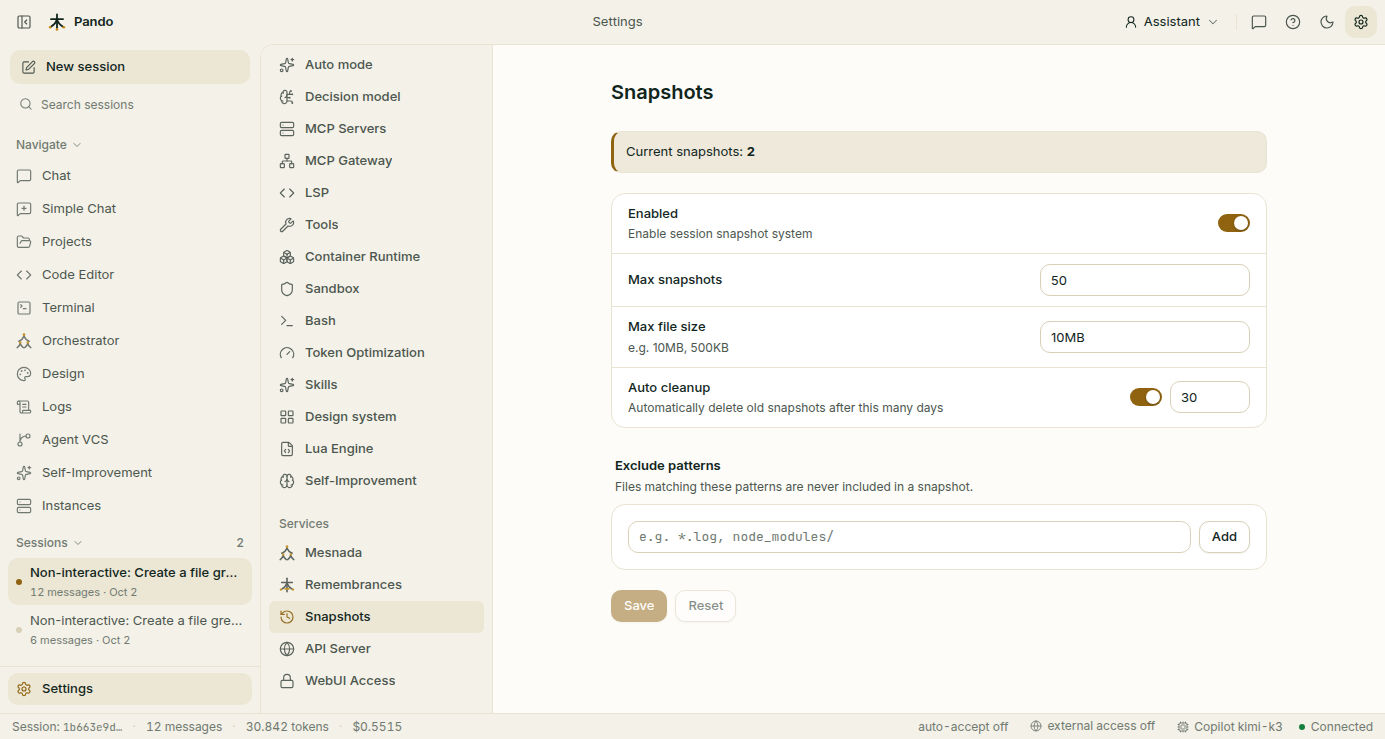
[Snapshots]
Enabled = true
MaxSnapshots = 5
MaxFileSize = '10MB'       # KB, MB or GB
ExcludePatterns = ['dist', 'node_modules', '.env', '.pando']
AutoCleanupDays = 5
pando agent-vcs sessions # list all sessions
pando agent-vcs log <session-id> # commit log of a session
pando agent-vcs show <commit-id> # commit details and diff
pando agent-vcs revert <commit-id> # restore the working directory to that commit
pando agent-vcs compact --keep 20 # keep only recent sessions
pando agent-vcs compact --days 30 # remove sessions older than N daysavcs is an alias of agent-vcs. A safety commit is created before every revert.
Enabled is false by default and it is the switch of Agent-VCS: without it no commits are recorded and the Agent VCS view stays empty. Restart Pando after changing it. One commit is made when a session starts (the baseline) and one after each agent turn. MaxSnapshots defaults to 100.
Concepts: commits are immutable snapshots with content-derived IDs (SHA-256) recording additions, modifications and deletions; trees are deduplicated file listings shared by commits with the same files; sessions are linear chains of commits, one per conversation; diffs are file-level changes between any two commits. Only modified files are stored in each commit.